Your entire outbound operation.
One system.
Find the right buyers, prepare clean lead lists, launch email and LinkedIn campaigns, and manage every reply in one connected workflow.
Invite only · we set you up on a demo call
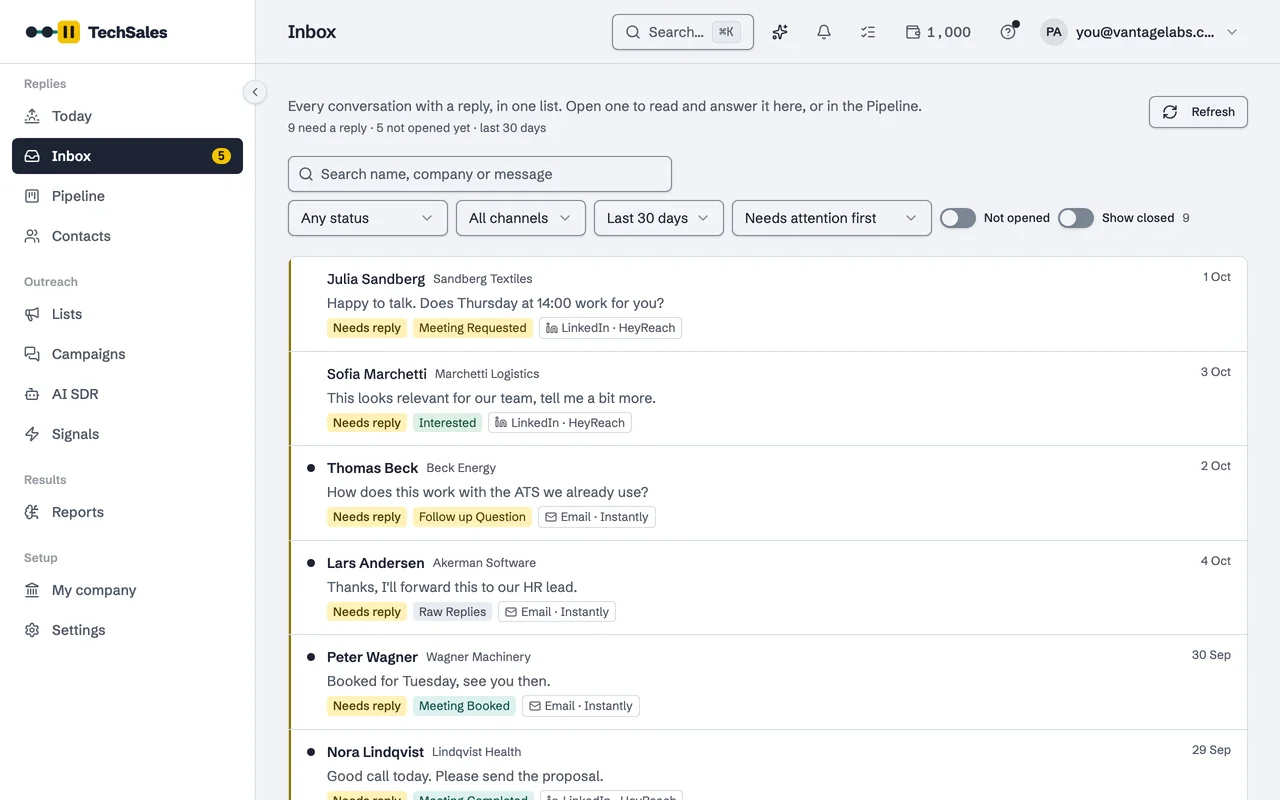
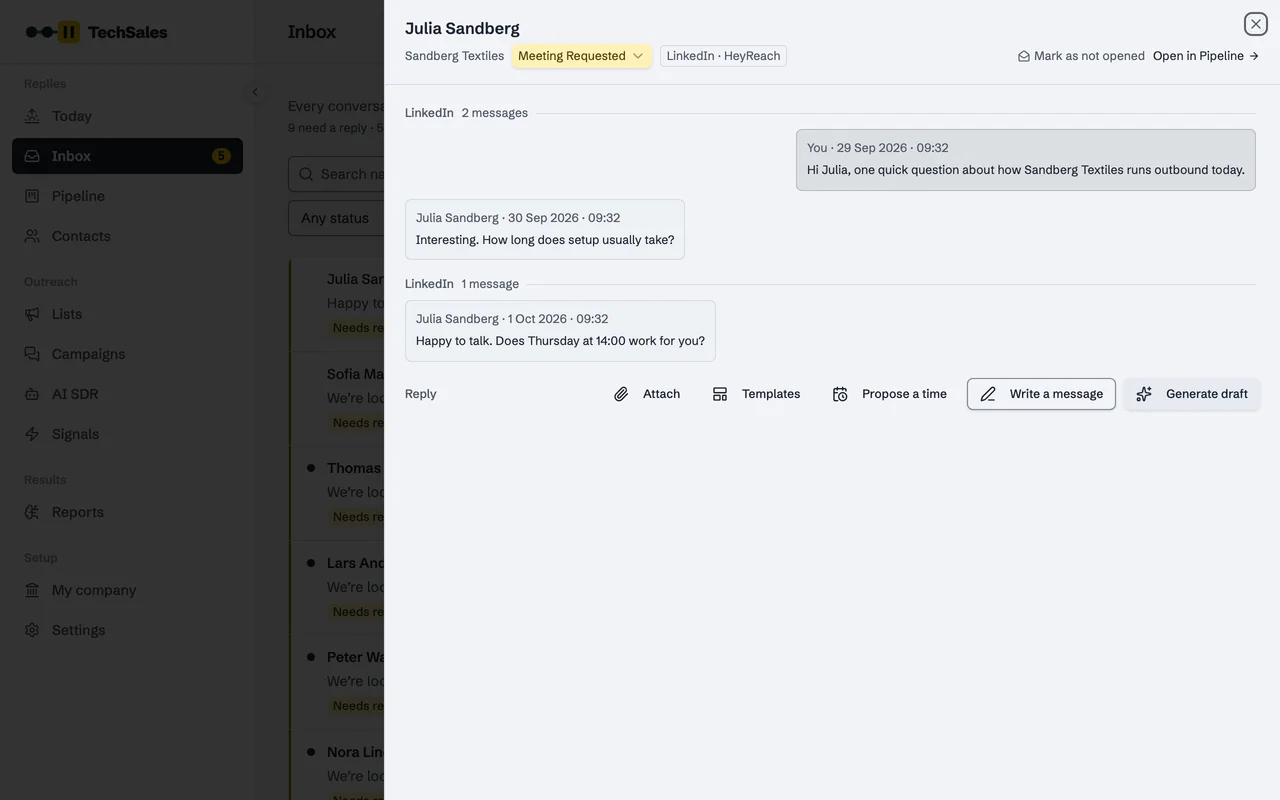
The Inbox: every email and LinkedIn reply in one list, sorted by what each person wants. Real product, sample workspace.
Less time moving files between tools.
“TechSales gave us a unified orchestration layer where each product keeps its own ICP context, while every reply flows into one clear pipeline. It eliminated hours of manual reconciliation every single week.”
 Rosan ErdemliCMO, Gobito Digital Solutions
“Having the entire workflow on self-serve with zero per-seat markup changed everything. We simply drop a list, waterfall verify, and watch meetings land on the calendar.”
 Serkan YağızCEO, Pitgrowth
“TechSales transformed our go-to-market execution from guesswork into pure operational clarity, helping us generate significantly higher reply volume while keeping our team entirely lean.”
 Mehmet KayaUK Managing Director, Patika Global Technology
Teams we have run outbound for
























Rather have us run outbound for you?
Our team can help manage your outbound operation, from prospect research and list preparation to campaign execution and performance reporting.
Backed by
 Esade EWorks Accelerator, Barcelona
 UPTEC incubator, Porto
Outbound breaks in the gaps between tools.
A list leaves the database, passes through a spreadsheet and a verifier, gets split across an email tool and a LinkedIn tool, and comes back as replies in two inboxes. Below, each handoff by hand next to the same step as one system. TechSales keeps your tools and removes the handoffs.
By hand
Six tools, a spreadsheet in the middle, and somebody moving files between them.
One system
The same tools. TechSales connects your accounts and moves the work between them.
1Find leadsBy handExport a search from Apollo or Sales Navigator
A CSV on one laptop; the next search starts from zero.
One systemImport or find leads straight into one list
2Clean the listBy handFix names and titles in a spreadsheet
Rows get lost or doubled, and nobody knows which copy is current.
One systemPrepare list tidies, sets aside with a reason and scores ICP fit
3Verify emailsBy handUpload to a verifier, download the results
One more export and import; the list now lives in three places.
One systemEvery email verified, catch-alls checked twice
4Pick a channelBy handSplit the list between Instantly and HeyReach by hand
The same person can end up in both tools.
One systemEach person routed to email, LinkedIn or both
5Send and replyBy handWatch two inboxes so nobody gets messaged twice
A reply on one channel does not stop the other.
One systemOne sequence on Instantly and HeyReach: a reply on one stops the other
6Update the CRMBy handCopy meetings into the CRM at the end of the week
Statuses go stale between one Friday and the next.
One systemReplies in one inbox; meetings and stages synced to HubSpot
By handEvery handoff is a re-export: lost rows, stale statuses, and hours a week spent moving files.
One systemThe same run, one record per person. The status follows them from list to reply.
Outbound costs far more when you pay for every tool separately.
Typical public list prices per month, October 2026.
Jobs TechSales covers
- B2B contact data
- ~€90
- Email finding and verification
- ~€45
- Signals and intent data
- ~€45
- AI copywriting
- ~€20+
- An AI SDR tool
- €450+
A month, and they still do not work together.
TechSales
from €199a month
One channel, email or LinkedIn, €199; both channels in one sequence €349. Contact data, verification, signals, AI writing and the AI SDR in one plan, paid from its monthly credits. Unlimited users.
See what TechSales costsSending, needed either way
- Email sending tool with warm-up
- ~€90
- Domains and mailboxes
- from ~€20
- LinkedIn automation
- ~€75 per user
Bring your own, or get mailboxes from TechSales: €5 a month each, domains included, set up and warmed up. LinkedIn sender seats for your own profile are on request. They are not part of the plan price.
What separate tools do not do
- Email and LinkedIn in one sequence, where a reply on one stops the other
- One inbox for every reply, with a stage and a draft
- An AI SDR that sees your sending capacity and refills it
- Data that moves between steps without an export and an import
From a raw list to a booked meeting, in five steps.
Each step is a screen in the product. Do them yourself, or let the AI SDR prepare them for you.
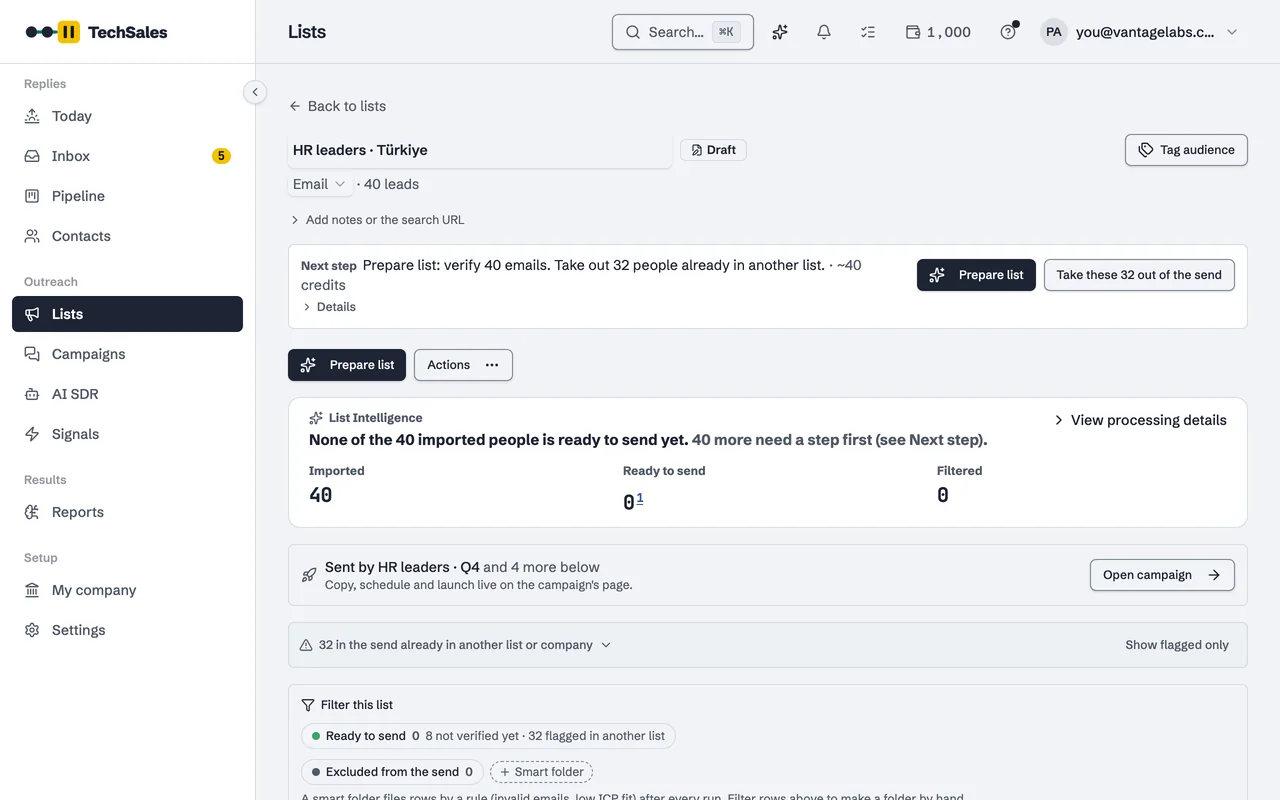
01Prepare the list
- What happens
- Import from Apollo, Sales Navigator, Clay, HubSpot or a CSV. Prepare list runs in one panel: tidy names and titles, set aside rows that do not fit with the reason, score each person's ICP fit, find work emails and check LinkedIn activity.
- Why it matters
- The list you send to is the list you meant to build, and nothing disappears without a reason you can read.
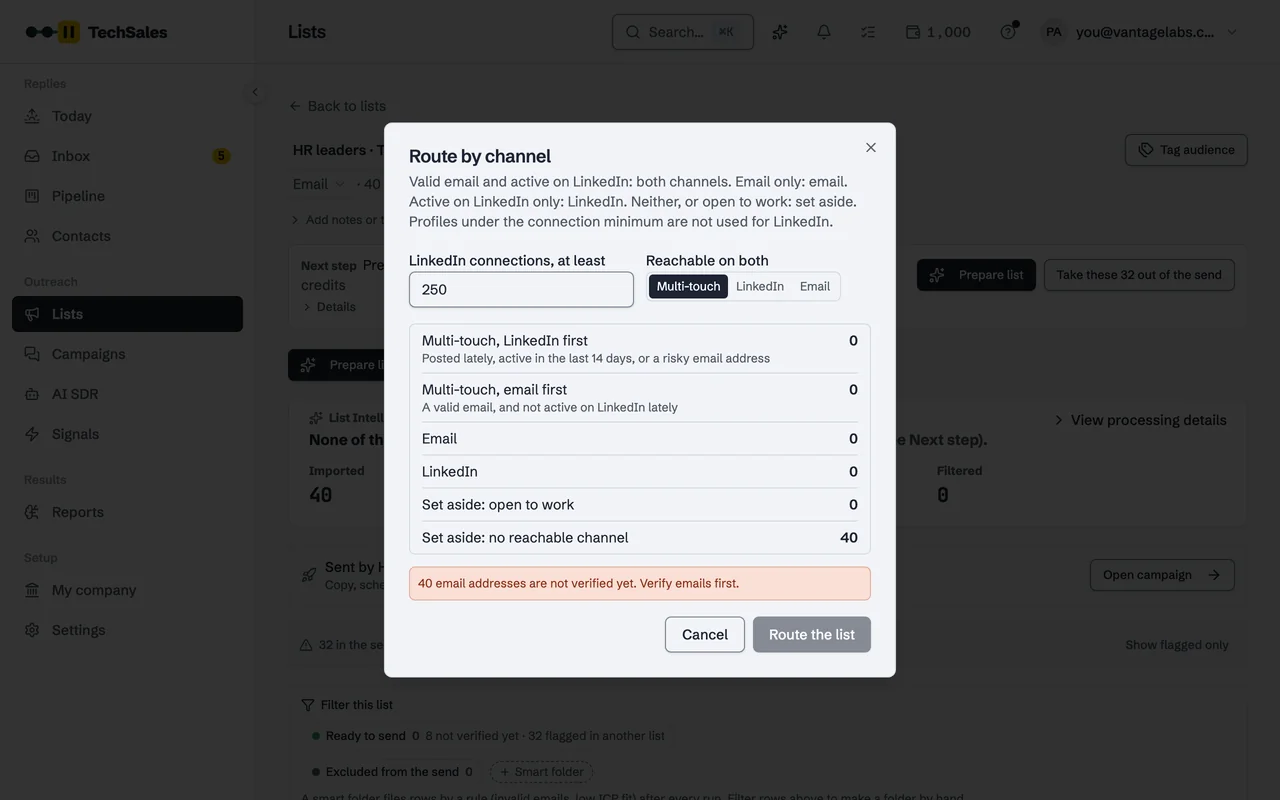
02Verify and route by channel
- What happens
- Every address is verified, and catch-all addresses get a second check. Then each person goes where they can be reached: email, LinkedIn or both in one sequence.
- Why it matters
- Bounces stay low, so your sending domains stay healthy, and nobody is messaged on a channel they never use.
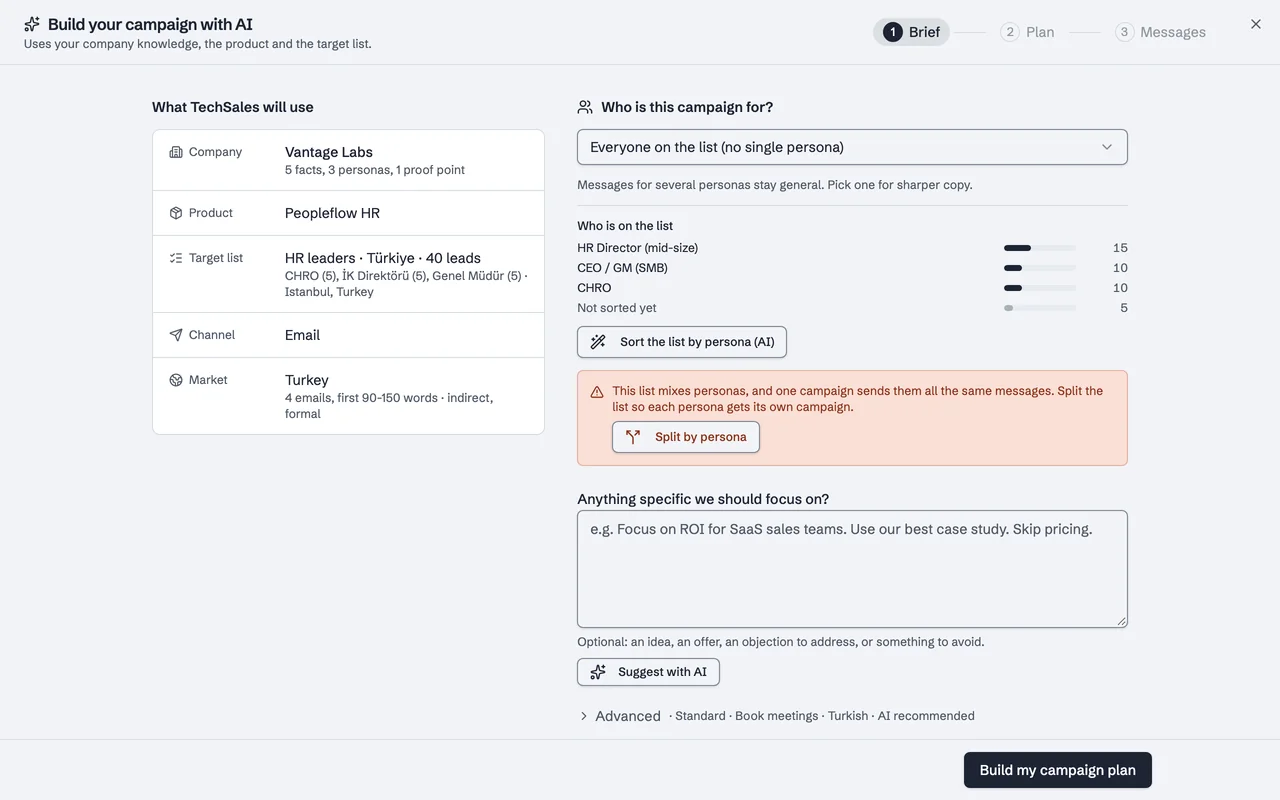
03Write and launch on email and LinkedIn
You read the campaign and press Start.
- What happens
- Campaign Builder writes from what you sell, who you sell to and who is on the list, in English or Turkish. The campaign runs on your own Instantly or Smartlead and HeyReach or Dripify accounts, best fits first. On Instantly and HeyReach, a reply on one channel stops the other.
- Why it matters
- One sequence across two channels, without exporting a list twice or messaging the same person from two tools.
04Manage every reply in one inbox
- What happens
- Email and LinkedIn replies land together, each marked with what the person wants: a meeting, a question, not now. Open one, get a draft in your voice, propose a time from your calendar.
- Why it matters
- Interested people get an answer the same day, whichever tool their reply came through.
05See what books meetings
- What happens
- Reports follow every list and campaign: replies, positive replies, meetings, sending health and pipeline value. Meetings found on your calendar move the lead's stage, and HubSpot stays in sync.
- Why it matters
- You keep the personas and copy that turn into meetings, and stop paying for the ones that do not.
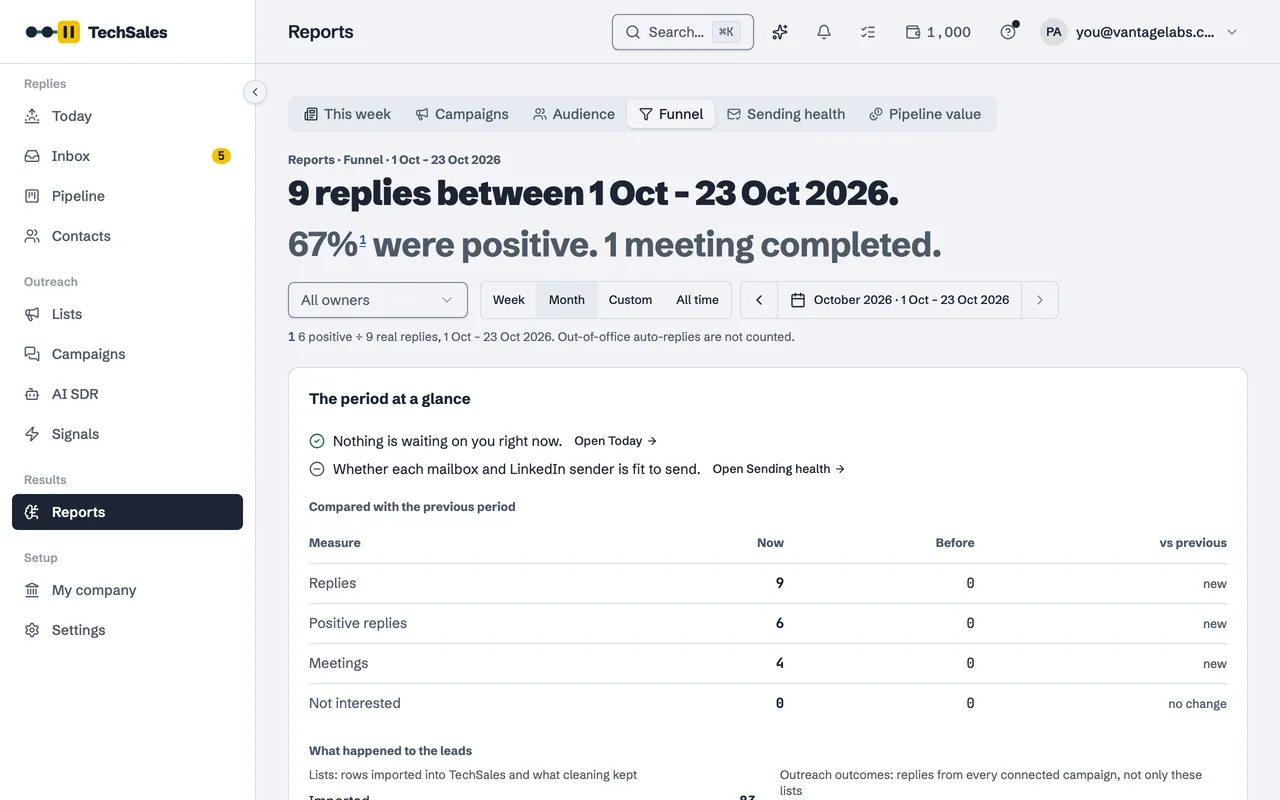
Real product screens on a sample workspace with invented people.
From a customer
“TechSales gave us a unified orchestration layer where each product keeps its own ICP context, while every reply flows into one clear pipeline.”
It eliminated hours of manual reconciliation every single week.
Rosan ErdemliCMO, Gobito Digital SolutionsSwitch on the AI SDR when you want it. It works inside your rules.
When a channel runs low on people to contact, the AI SDR builds the next list, prepares it and writes the campaign. You choose how far it goes.
1OffNothing happens by itself. You build lists and campaigns yourself.- PrepareIt builds the list, cleans it and drafts the campaign. You read it on Today and press Start.
3Run on its ownIt starts only personas and copy that already worked, within your credit cap. In every plan.
The rules it never steps outside
- A weekly credit cap
- It shows the cost before a run and never spends past the cap you set.
- A safety brake
- High bounces or a run of negative replies pause the campaign, with the reason.
- Platform health
- A sending account in error or a LinkedIn seat signed out stops it before it spends.
- It asks instead of guessing
- No persona, no proven copy: it waits for you rather than sending.
- A Monday report
- What it built, what it cost and what came back, in your inbox if you want it.
What else TechSales does.
Things you would otherwise buy as separate tools. Each one is in every plan.
- Ask Claude or ChatGPT about your pipelineConnect claude.ai, ChatGPT or another MCP assistant and ask about leads, campaigns, capacity and credits. It only reads.How it works
- See which leads visit your websiteOne script on your site names leads who come back, with the pages they read. Known leads only, no reverse-IP.How it works
- Know when a document is openedSend a deck from your library as a link and get an email when the lead opens it, with read time and pages.How it works
- Meeting requests answered with real timesToday lists requests still waiting and has a reply ready with two free times and your booking link. You press Send.How it works
- Past champions who change jobsPeople who backed you or replied warmly are rechecked on LinkedIn. When one moves, you get a signal or a reminder.How it works
- Find the right personWhen a reply says you reached the wrong person, a free search finds your persona's titles at that company.How it works
One package, priced by channel.
Pick the channels you sell on. The AI SDR, unlimited users and unlimited products are in every plan; agencies get a workspace per client.
Outbound on LinkedIn, with the AI SDR.
2,500 plan credits a month
Outbound by email, with the AI SDR.
2,500 plan credits a month
Email + LinkedIn
Both channels in one sequence, with the AI SDR.
5,000 plan credits a month
Agency / Partner
For agencies that run outbound for their own clients.
15,000 plan credits a month
5 client workspaces included, €99/mo for each one more
How it works for agenciesThe AI SDR, unlimited users and unlimited products in every plan. 14-day trial; access is invite only and starts with a demo. Earn 1,000+ free credits as you set up.
Runs on the tools you already pay for.
TechSales connects to your own accounts and moves the work between them. Your contracts, your sending domains, your data.
01FindWhere lists come from

 treg
treg


 Google Sheets
02VerifyEmails found and checked
 Reoon
Reoon

03SendYour own sending accounts
04Reply and bookMailbox and calendar
 Gmail
Gmail Microsoft 365
05TrackCRM, alerts, your AI assistant


 Claude
 ChatGPT




Bring your own API keys and the work on them uses no TechSales credits. Everything else draws from one credit balance; purchased credits never expire.
See every integrationWho is TechSales for?
B2B companies that win customers through outbound: sales teams, founders who still sell, and agencies running outbound for several clients. It is built for teams that reach buyers on both email and LinkedIn.
Do I need Apollo, Instantly or HeyReach already?
You need a way to send. Bring your own tools (Instantly or Smartlead for email, HeyReach or Dripify for LinkedIn), or get mailboxes from TechSales: domains included, set up and warmed up, ordered in the product. LinkedIn sender seats for your own profile are on request. People data can come from TechSales on credits, so Apollo is optional.
How do I get access?
Access is invite only. Request a demo with your work email: we walk you through TechSales on a call, then set up your workspace with a 14-day trial. You earn 1,000+ free credits as you set up.
How does pricing work?
One package priced by channel: LinkedIn €199/mo, Email €199/mo, or Email + LinkedIn €349/mo, and Agency / Partner €990/mo for agencies with client workspaces. Each includes plan credits every month for data work; they expire at the end of the cycle, while credits you buy or earn never expire. The AI SDR is in every plan.
Will the AI SDR send things without me?
Only if you set it to. Off: nothing happens by itself. Prepare: it builds the list and the campaign, and you press Start. Run on its own: it starts only personas and copy that already worked, within your weekly credit cap, and pauses itself on high bounces or negative replies.
Where does my data live, and who can see it?
Each workspace's data is kept separate, and the API keys you connect are stored encrypted. We never resell prospect data, and you can export your lists as CSV at any time. The security page has the details.
Which languages and markets does it support?
The interface and Campaign Builder work in English and Turkish. Lists follow a market pack for the target country (DACH, UK & Ireland, US, France, Nordics & Benelux, the Gulf, Turkey), which sets name casing and forms of address.
Run outbound as one system.
Request a demo to see it on your own list and your own tools. If you would rather our team ran it, we cover that on the same call.
Invite only · no minimum term