Guide
How to run LinkedIn and email outreach in one sequence
Short answer
Decide per person which channel they get, put both channels on one timeline, and stop the other channel the moment someone replies. The hard part is not writing the steps but keeping two tools in sync, so nobody gets a LinkedIn message after they answered your email.
In short
- Multi-touch outreach works best when each person is routed by their data, not when everyone gets every step.
- A reply on one channel must stop the other, or the second channel undoes the first.
- Out-of-office replies should not count as replies; opt-outs should stop the person everywhere.
Last checked:
Step by step
- Verify every email address and check who is active on LinkedIn.
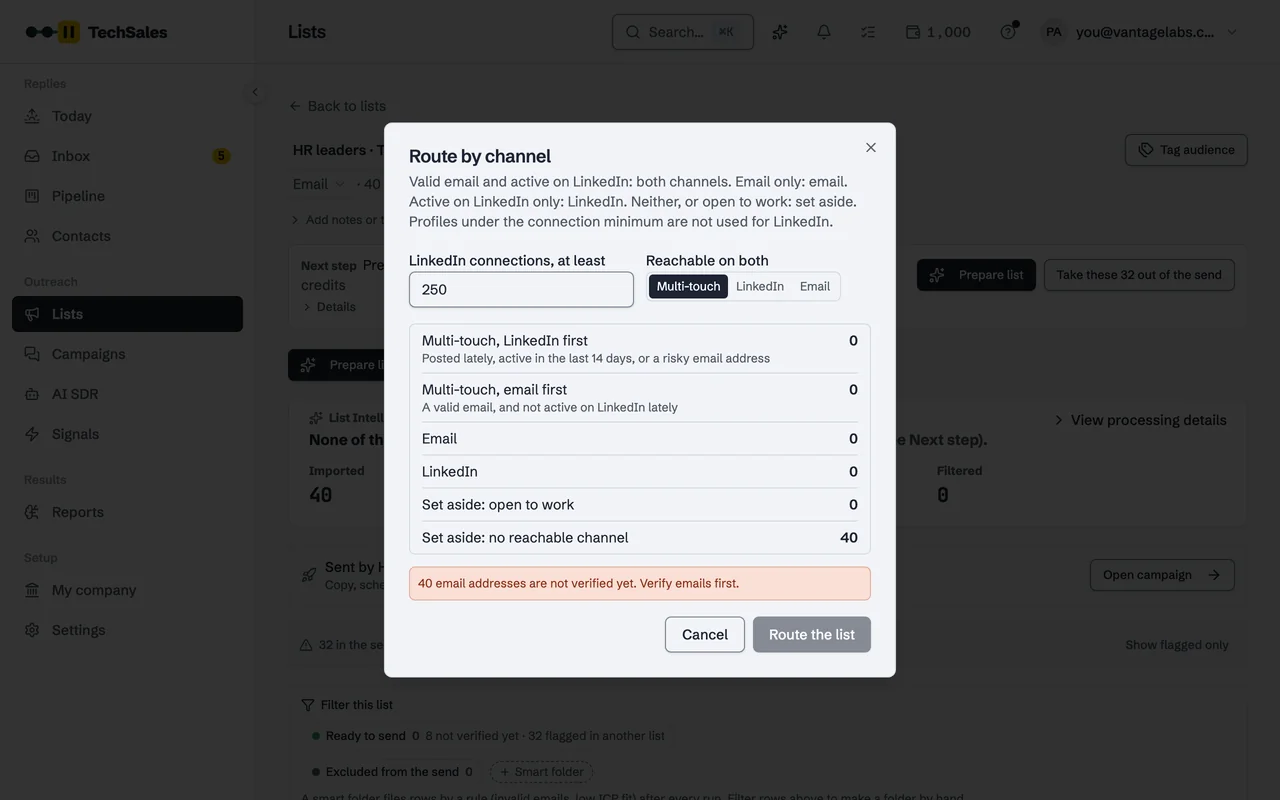
- Route each person: both channels when they have a valid email and an active profile, otherwise the one channel that reaches them. Set aside people who are open to work.
- Write one sequence with steps for both channels, for example an email, a connection request without a note, a follow-up email, a LinkedIn message.
- Start on the channel the person is most likely to see first: LinkedIn for people who posted recently, email otherwise.
- Check for replies on both channels and stop the other channel as soon as someone answers.
Where it usually breaks
- The list is split by hand and the same person lands in both tools without a shared timeline.
- A reply arrives in one tool's inbox and nobody stops the other campaign in time.
- LinkedIn seats are spent on profiles with few connections or no activity, which rarely see the message.
How TechSales does it
Route by channel sorts the list (a 250-connection minimum by default, open-to-work set aside, recent LinkedIn activity or a risky email puts LinkedIn first). The sequence runs on your Instantly and HeyReach accounts with one approval, and every 15 minutes TechSales stops the other channel for anyone who replied. See Email and LinkedIn in one sequence.
Frequently asked questions
- Should everyone get both channels?
- No. People who are not active on LinkedIn rarely see a message there, and a risky email address is better reached on LinkedIn. Route by the data you have.
- Email first or LinkedIn first?
- LinkedIn first for people who posted recently or whose email is uncertain; email first for everyone else.
- Which tools do this?
- Some all-in-one tools send both channels themselves. TechSales coordinates Instantly for email and HeyReach for LinkedIn. See TechSales vs Instantly + HeyReach separately.
See it on your own market
Access is invite only and starts with a demo call. We walk through TechSales on your own list and tools.