Email finding and verification
A bounce rate above a few percent gets a mailbox throttled. TechSales finds missing work emails and verifies every address before a campaign can start, and charges nothing for rows that come back empty.
In short
- Missing emails are looked up in order: your own Apollo key if connected (otherwise TechSales' managed data source), then Kitt; the search stops at the first hit.
- Verification runs Reoon first, then BounceBan as a second pass only on the addresses Reoon returns as catch-all or unknown.
- Invalid addresses go to an Invalid emails folder and catch-all or unknown ones to Risky emails, so you choose whether to send to them.
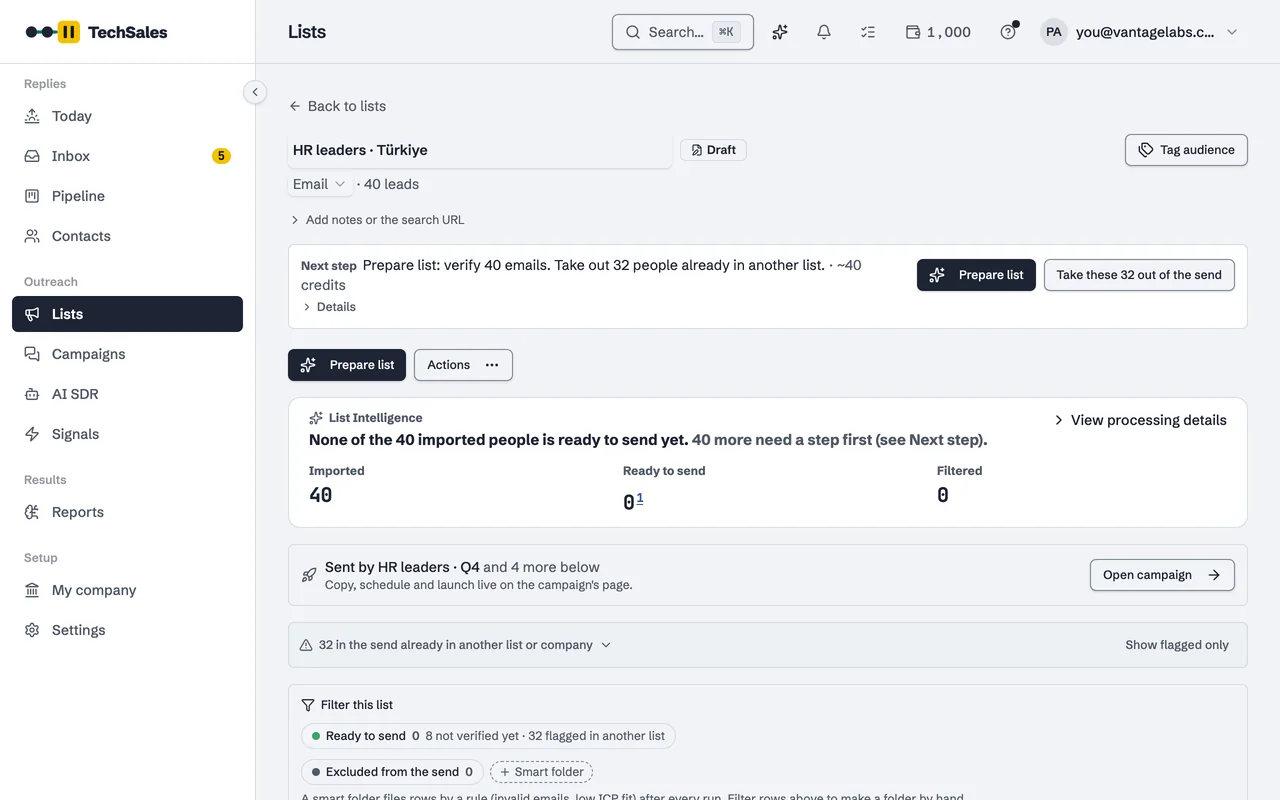
- A list with unverified addresses carries a warning before launch: bounces above 3 percent get a mailbox throttled.
- Credits are reserved before a run and refunded for anything not found; work on your own provider key uses no TechSales credits.
Instead of: a separate email finder and a separate verifier, with CSV uploads and downloads between them. Run on your own Reoon, BounceBan or Apollo key, or on TechSales credits.
Last checked:
Finding a work email
When a row has a name and a company but no email, Find emails looks it up. The first lookup uses your own Apollo key if you connected one, or TechSales' managed data source if not. If that finds nothing, Kitt is tried next. The first address found is used and the search stops there, so a row is never paid for twice.
A single contact can also be filled in from its own page: a work email, a phone number or a missing company domain, job title or LinkedIn profile. Enrichment only fills blanks; it never overwrites what a person entered.
Two-pass verification
- Every address is checked with Reoon. Valid ones are marked ready to send; invalid ones move to the Invalid emails folder.
- Addresses Reoon cannot confirm, catch-all domains and unknown results, get a second check with BounceBan, which is built for catch-all servers.
- Whatever is still uncertain stays in Risky emails. It is not sent unless you move it back.
Results are cached across the platform, so checking an address that was verified recently does not cost a second time.
Why it is enforced before launch
Sending tools throttle or pause a mailbox when bounces climb, and a burned domain takes weeks to recover. So the campaign checklist warns when part of a list is unverified, and Sending health in Reports watches the bounce rate per mailbox after launch: watch from 2 percent, at risk from 3 percent.
Frequently asked questions
- What is a catch-all address?
- A domain that accepts mail for any address, so a normal check cannot tell whether a specific person exists. That is why catch-all results get a second pass with a verifier built for them, and why anything still uncertain is kept apart.
- Can I use my own Reoon, BounceBan or Apollo account?
- Yes. Connect your own key and those operations run on your account and use no TechSales credits.
- Am I charged for emails that are not found?
- No. Credits are reserved before a run and refunded for every row that comes back empty. See Pricing for how credits work.
- Does verification remove role addresses like info@?
- Not automatically. A shared mailbox on an unverified list triggers a warning at launch; on a verified list the verifier marks role accounts as risky.
See it on your own market
Access is invite only and starts with a demo call. We walk through TechSales on your own list and tools.