Reports: from list to meeting, per channel
Reports answers the questions a team asks every Monday: how many replies came in, how many were positive, how fast you answered, which audience worked and whether the mailboxes are healthy.
In short
- Six tabs: This week, Campaigns, Audience, Funnel, Sending health and Pipeline value.
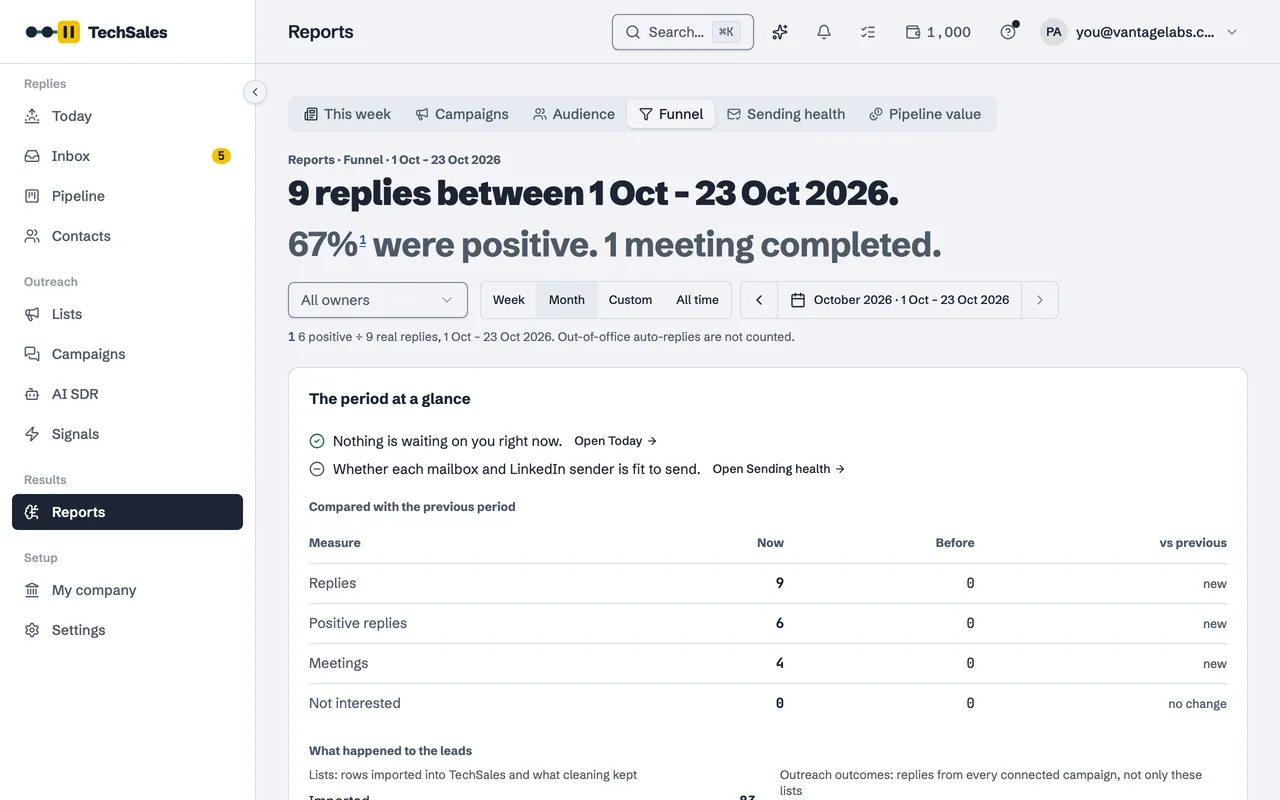
- The Funnel shows replies, positive replies and meetings for any period against the previous one, with out-of-office replies left out.
- First-response time: the median time to a first answer and the share answered within 4 hours, over the last 30 days.
- When replies arrive: a weekday by hour grid that suggests a sending window once there are 100 replies.
- Sending health checks every mailbox and LinkedIn seat every six hours and flags bounce rates from 2 percent.
Instead of: a weekly spreadsheet stitched together from each tool's own statistics.
Last checked:
The six tabs
| Tab | What it answers |
|---|---|
| This week | What happened since Monday and what needs your attention. |
| Campaigns | Results per campaign and per channel. |
| Audience | Which personas and segments replied and booked, and the ICP score against the outcome. Dead segments can be left out of future searches. |
| Funnel | Imported, cleaned, contacted, replied, positive, meeting: where leads move and drop. |
| Sending health | Bounce rate and warm-up score per mailbox, and LinkedIn seat status. |
| Pipeline value | Deal value recorded on leads, by stage. |
First-response time
Interested replies cool quickly. The Funnel tab shows the median time from a reply to your first answer, and the share of replies answered within four hours, over the last 30 days. The Pipeline also reminds you about leads waiting more than two days.
When replies arrive
A grid of weekdays by hours shows when people actually answer. Once a workspace has 100 replies it suggests a sending window: the three busiest hours, starting half an hour earlier so your message is on top when they open their inbox.
Sending health
Every six hours each mailbox is checked for bounce rate and warm-up score, and each LinkedIn seat for its status. A mailbox needs at least 20 sends to be judged. Bounce rate is marked watch from 2 percent and at risk from 3 percent; warm-up score watch below 80 and at risk below 60.
Frequently asked questions
- Where do the numbers come from?
- From your connected sending tools (Instantly, HeyReach, and Smartlead replies) and from the stages in your Pipeline. Out-of-office replies are not counted as replies.
- Can I filter by rep?
- Yes. Reports can be filtered by owner and by period: week, month, a custom range or all time.
- Is there a weekly summary by email?
- Yes. A weekly report can be switched on and arrives on Monday morning.
See it on your own market
Access is invite only and starts with a demo call. We walk through TechSales on your own list and tools.