Run your clients' outbound from one place
A TechSales workspace for each client, with email, LinkedIn and the AI SDR in every one, and an Agency console that shows all of them side by side. One subscription, on your agency's own workspace.
In short
- €990 a month with 5 client workspaces and 15,000 plan credits a month included; €99 a month for each extra workspace.
- Each client gets its own workspace: its own lists, connected sending tools, Inbox, reports and Do Not Contact list.
- The Agency console shows every client workspace in one table: what was sent, replies, interested people, meetings, credits, health, and what waits on an answer today.
- Every admin of your agency's workspace is automatically an admin of each client workspace.
Instead of: a separate tool stack per client, a spreadsheet to keep clients apart, and a Monday round of logging into each client's tools to see how it went.
Last checked:
The Agency console
The admins of your agency's own workspace get an Agency console in the app. It covers your client workspaces and nothing else, and it only reads: to answer a reply, launch a list or change a setting, you open the client's workspace from its row and work there.
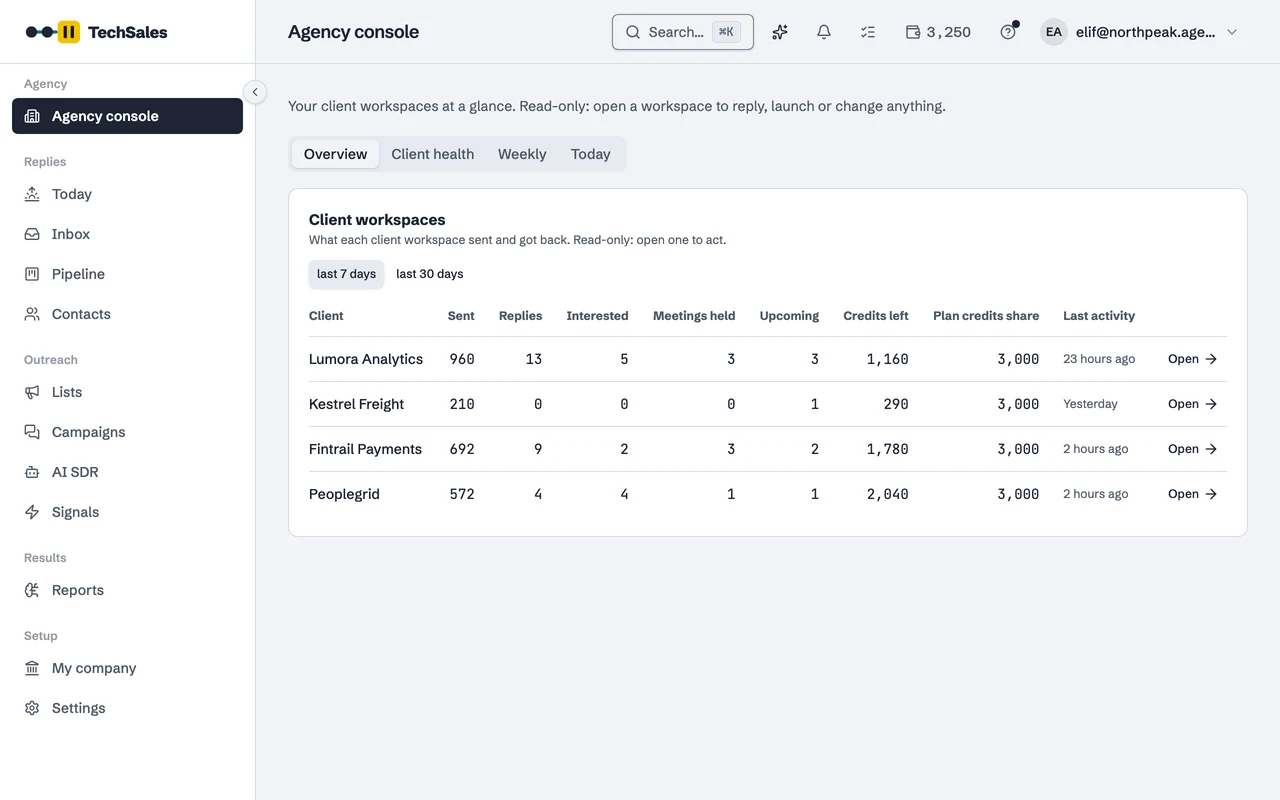
- Overview: per client, over the last 7 or 30 days, the messages sent on both channels, replies, interested replies, meetings held and upcoming, credits left, the client's share of plan credits and the last activity.
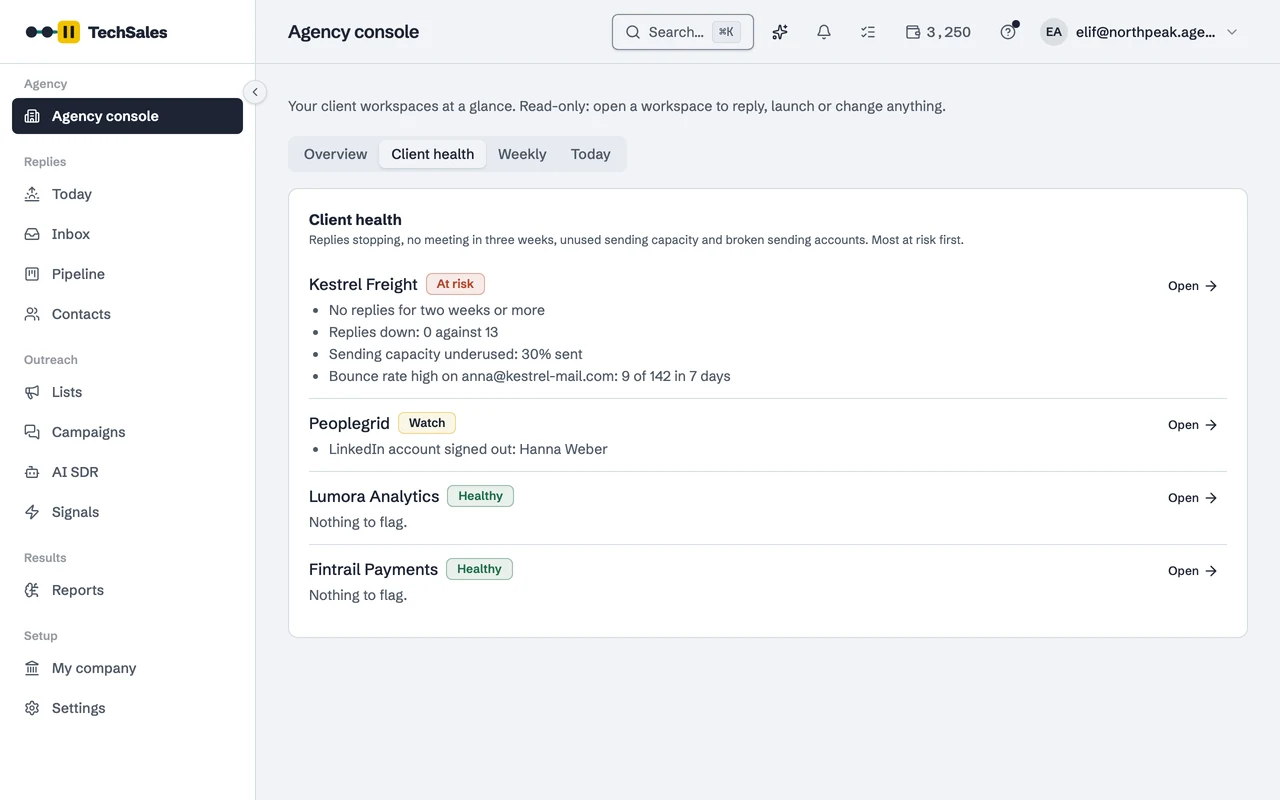
- Client health: each client as Healthy, Watch or At risk, most at risk first, with the reasons: no replies for one or two weeks, replies or the positive rate down against the two weeks before, no meeting in three weeks, sending capacity left unused, a mailbox bouncing at 3% or more, a disconnected mailbox or a signed-out LinkedIn account.
- Weekly: the latest weekly summary written for each client, with its last seven days in numbers. Earlier weeks open under it.
- Today: per client, the conversations that need a reply, replies nobody has opened, replies held for a person to review, replies that failed to send, and broken connections or sending accounts.
A workspace per client
- You open a workspace for each client from your plan settings. It is a full TechSales workspace: list preparation and verification, campaigns, the Inbox, Signals and Reports, all scoped to that client.
- Both channels in every workspace: email through Instantly or Smartlead and LinkedIn through HeyReach or Dripify, connected with that client's own keys, and both in one sequence where a reply on one stops the other.
- The AI SDR in every workspace, in each of its modes: Off, Prepare or Run on its own.
- Plan credits are shared. At each renewal the 15,000 are split evenly across your agency's workspace and your client workspaces: with 5 client workspaces, each of the six gets 2,500. Plan credits expire at the end of the cycle; credits you buy do not.
- Every admin of your agency's workspace is an admin of each client workspace, including workspaces opened later and admins added later. Someone a client workspace keeps as a member stays a member.
- You can invite your client's own people into their workspace. They see that workspace only: not your other clients and not the Agency console.
Price
- €990 a month, with 5 client workspaces and 15,000 plan credits a month included.
- €99 a month for each client workspace beyond 5, added to your subscription when you open it.
- Example: 8 client workspaces cost €1,287 a month (€990 + 3 × €99).
- Unlimited users and unlimited products in every workspace. All plans side by side: Pricing.
How it protects your clients' reputation
An agency sends in its clients' names, so one careless send costs the client, not you. These checks run in every client workspace:
- Each client workspace keeps its own Do Not Contact list. A reply is checked against it before it goes out, whether a person wrote it, scheduled it or the AI SDR sent it, and someone who asks to be left alone on email or LinkedIn is added to it.
- Every morning TechSales runs data checks on each workspace for states the data must never be in, such as someone on Do Not Contact still in a live send, the same person in two live lists, the same person twice in one list. Certain Do Not Contact matches are taken out of the send before it goes.
- Campaign emails carry a short "Not interested? Unsubscribe" line at the bottom, in the language of the copy, on by default for each workspace. One click puts the person on that client's Do Not Contact list and stops them in its campaigns.
Frequently asked questions
- How much does the Agency / Partner plan cost?
- €990 a month with 5 client workspaces and 15,000 plan credits a month, plus €99 a month for each client workspace beyond 5. See Pricing.
- Can I answer replies from the Agency console?
- No. The console shows how many conversations need a reply in each client workspace; you open the workspace from that row and answer in its Inbox.
- Can my clients log in?
- Yes. Invite their people into their own workspace. They see that workspace only, never your other clients or the Agency console.
- Does sending run on my clients' own accounts?
- Yes. In each workspace you connect that client's Instantly or Smartlead, HeyReach or Dripify, HubSpot and Calendly with their keys, so their mail and LinkedIn go out from their own accounts.
- What happens to credits when I open a workspace mid-cycle?
- Plan credits are split at each renewal, so a workspace opened mid-cycle gets its share from the next renewal on. Credits bought for a workspace never expire.
- Can I offer it under my own brand?
- Not yet. Client workspaces carry the TechSales name.
- Does TechSales invoice my clients?
- No. You hold one subscription; what you charge your clients is up to you.
See it on your own market
Access is invite only and starts with a demo call. We walk through TechSales on your own list and tools.